DevSecOps automation in 2026 is not about adopting more security tools. Most engineering organizations already have scanners, dashboards, cloud security platforms, and alerting systems. The real issue is that many of these controls still depend on manual enforcement, inconsistent execution, or security teams acting as gatekeepers after problems already exist. That model does not scale. DevSecOps automation matters because it moves security from “someone must remember to do it” to “the system enforces it every time.”
In practice, DevSecOps automation is what separates pipelines that stay predictable under pressure from pipelines that slowly accumulate security debt. The same patterns repeat across organizations: secrets accidentally committed into repositories, dependency vulnerabilities discovered too late, cloud resources deployed with permissive defaults, container images shipped without policy enforcement, and compliance reporting treated as a manual end-of-quarter exercise. These issues are not caused by a lack of security awareness. They are caused by workflows that are not automated enough to be reliable.
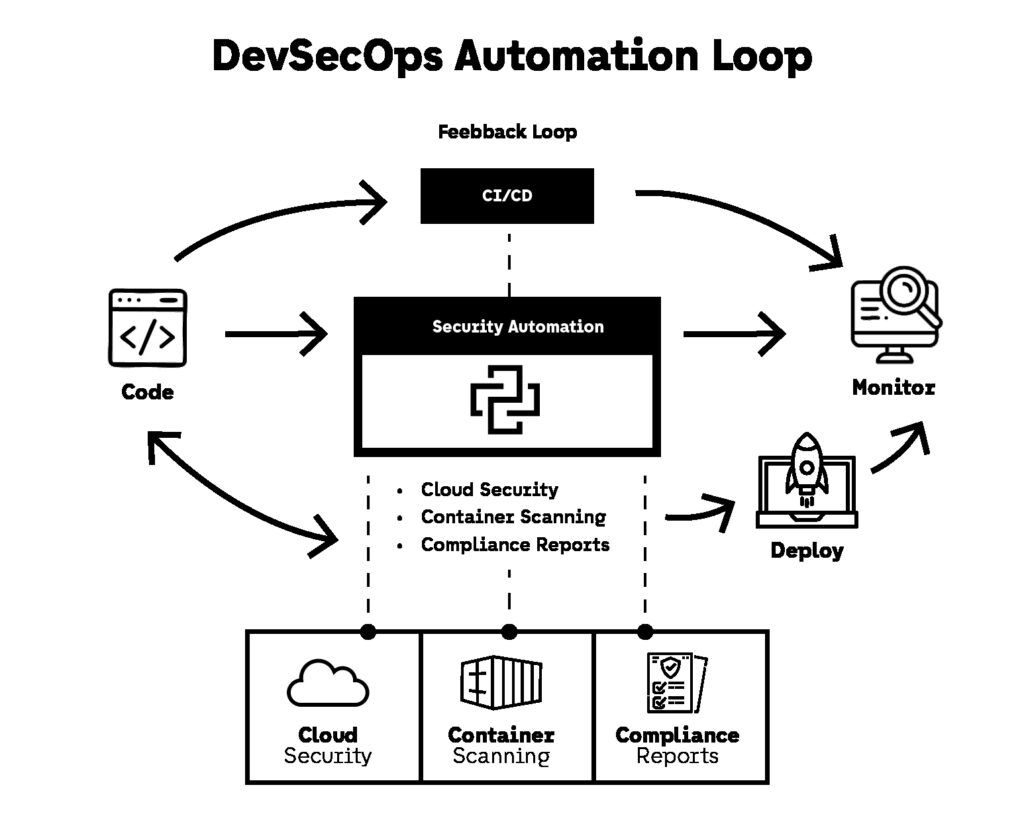
Python has become one of the most effective languages for DevSecOps automation because it fits directly into the modern delivery ecosystem. It runs cleanly inside CI/CD environments, integrates with cloud APIs, parses vulnerability scan outputs, and allows security teams to build automation that engineers can understand and maintain. The result is not just faster pipelines. The result is less operational chaos.
This guide covers 7 Python automation scripts that consistently save time in real DevSecOps automation workflows. Each one targets a high-friction bottleneck that security and platform teams deal with every week: secrets detection, dependency vulnerability reporting, cloud misconfiguration detection, container image enforcement, Kubernetes policy validation, compliance evidence generation, and incident alerting automation.
If you want a broader view of why these automation categories matter right now, Top Cybersecurity Threats of 2025 and How to Combat Them provides strong context on the threat patterns that modern DevSecOps automation is designed to prevent.
1. Automation #1: Block Secrets Before They Ever Reach the Repository
DevSecOps automation starts with the most common security failure that still wastes time in every engineering organization: secrets leaking into source control. Even mature teams experience it, not because developers are reckless, but because modern systems require an endless number of credentials. API keys, cloud tokens, private keys, database passwords, CI/CD secrets, and OAuth tokens all end up being copied around during debugging, local development, or configuration work.
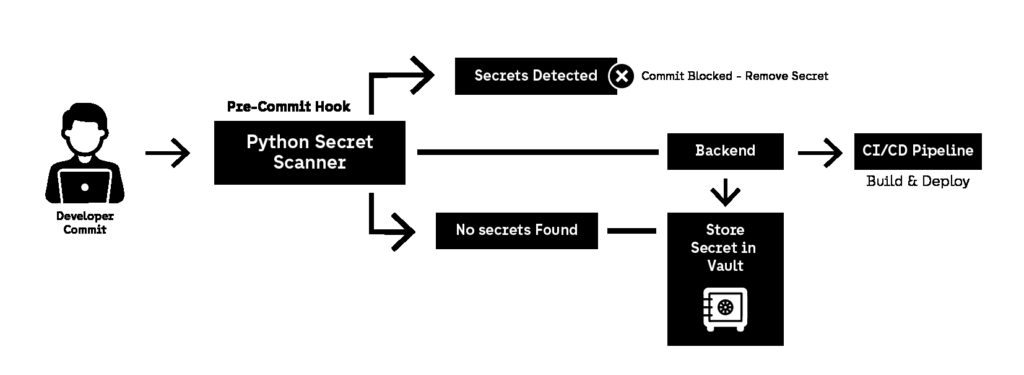
Once a secret is committed, the cost is never limited to removing it from code. Incident response becomes unavoidable. Teams must rotate credentials, check access logs, validate whether the secret was used externally, and often redeploy multiple services. That is time wasted on a preventable failure. DevSecOps automation solves this by shifting secret detection to the earliest possible stage: before the commit is even accepted.
A strong secrets workflow is one of the highest ROI DevSecOps automation investments because it prevents an entire class of incidents without requiring security team involvement. It also improves developer behavior over time by making secret storage standards non-negotiable.
What this automation does
This automation is designed to:
- scan staged changes before code is committed
- detect high-confidence credential patterns
- block commits automatically if secrets are found
- output actionable feedback without exposing the secret itself
- act as a forcing function toward secrets managers and vault workflows
This is DevSecOps automation at its most practical: it prevents incidents by making insecure behavior impossible to ship.
Why it matters in real pipelines
Many teams only run secret scanners inside CI/CD. That helps, but it is not enough. If secrets are detected only after a push, the credential is already stored in Git history and may already be present in:
- pipeline logs
- build artifacts
- cached CI/CD workspaces
- repository mirrors and forks
DevSecOps automation should prevent the secret from being recorded in the repository at all. That means detection must happen locally first, then again in CI/CD as a backup enforcement layer.
How it works (Python approach)
Python fits secret scanning automation because it is lightweight and easy to embed into developer workflows. The most effective approach is scanning the staged Git diff rather than scanning the entire repository, because it reduces noise and provides immediate feedback.
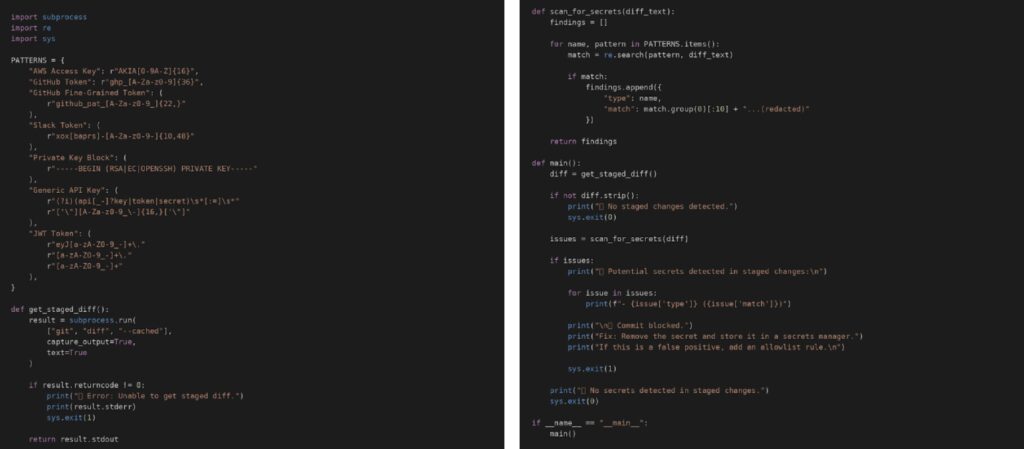
This script reads staged changes, scans them for common secret patterns, and blocks the commit if matches are detected.
Example: Python staged-change secret detector (full code)
Where this automation should run
To be effective, DevSecOps automation must assume people will bypass controls under pressure. That’s why this automation should run in two places.
The first layer is a developer-side pre-commit hook. This prevents most secret leaks instantly, with almost no friction. It creates a fast feedback loop and trains developers to treat secrets as operational assets rather than configuration text.
The second layer is CI/CD enforcement. Even the best pre-commit workflow can be bypassed by bots, bulk merges, skipped hooks, or emergency hotfixes. CI/CD must still fail the pipeline if secrets are detected. DevSecOps automation is only reliable when enforcement is redundant.
Common failure modes (and how to avoid them)
The most common reason secret scanners get disabled is false positives. If DevSecOps automation blocks commits too often, teams will route around it, skip hooks, or hard-disable the workflow. The fix is not weaker scanning. The fix is better usability: allowlists for known safe patterns, clearer output messaging, and entropy-based detection that reduces noise without lowering security.
Another failure mode is legacy configuration practices where teams still store secrets directly in environment files committed into repositories. In those cases, DevSecOps automation should be treated as a forcing function that accelerates migration toward secrets managers and vault workflows. If you want a strong reference on how modern teams should handle this, OWASP Cheat Sheet Series: Secrets Management provides practical guidance that aligns well with automated enforcement.
This is exactly why secret detection is one of the highest ROI DevSecOps automation patterns. It prevents emergency credential rotation, reduces incident response overhead, and removes an entire class of “avoidable security work” from both engineers and security teams. In most environments, leaked secrets become exploitable because they enable direct access to APIs, services, or cloud resources, which is why API Security Playbook: 10 Best Practices Developers Should Follow is a strong complement to this automation strategy.
Automation #2: Generate PR-Readable Dependency Vulnerability Reports (and Fail Builds Only When It Matters)
Dependency scanning is one of the most common DevSecOps automation activities in modern pipelines, but it is also one of the most frustrating. Most teams already run scanners. The problem is that the output is rarely designed for humans. Instead of giving developers a clear answer, tools produce long JSON dumps, inconsistent severity scores, and vulnerability lists that look urgent even when they are not exploitable in real runtime paths.
This is where DevSecOps automation must evolve. Scanning alone is not a security control. Scanning is a signal. The real value comes from automation that turns scanner output into a decision: should this PR be blocked, should it be allowed, and what exactly must be updated to fix the risk. Without that translation layer, vulnerability scanning becomes noise and engineering teams either ignore it or drown in security tickets.
The most effective dependency workflow is not “scan everything.” It is DevSecOps automation that produces a short report that can be read inside the pull request, with clear severity grouping and a remediation path. When done correctly, this reduces operational overhead for security teams and removes ambiguity for developers.
What this automation does
This automation should:
- run dependency scanning automatically for every pull request
- parse the scan output into a short Markdown report
- group findings by severity (CRITICAL, HIGH, MEDIUM, LOW)
- identify which vulnerabilities are blocking and which are informational
- show upgrade paths or fixed versions when available
- fail the build only if policy thresholds are exceeded
This is DevSecOps automation that saves time because it prevents vulnerability triage from becoming a recurring manual process. Instead of a security engineer interpreting scan results and opening tickets, the pipeline produces a report that engineers can act on immediately.
Why it matters at scale
At scale, dependency vulnerabilities are constant. Every week, new advisories appear, CVE databases update, and common packages get flagged across multiple services. If DevSecOps automation is not designed to prioritize and filter results, engineering teams will experience alert fatigue and stop taking vulnerability output seriously.
This is why mature teams enforce policy-based gating such as:
- fail builds only for HIGH and CRITICAL vulnerabilities
- warn for MEDIUM vulnerabilities but allow merge
- ignore LOW vulnerabilities unless they affect internet-facing packages
- treat authentication, parsing, crypto, and networking libraries as higher risk
The goal is not to eliminate all vulnerabilities instantly. The goal is to make security enforcement predictable and repeatable, which is exactly what DevSecOps automation exists to do.
How it works (Python approach)
Python works well here because it acts as a normalization layer between security tooling and developer workflow. Different scanners produce different formats, but DevSecOps automation should not depend on tool-specific output structures. A single Python script can take JSON output from your chosen scanner and generate a consistent report format that can be used across multiple repositories.
A practical dependency workflow looks like this:
- Run a scanner in CI/CD (pip-audit, Trivy, OSV Scanner, Safety, etc.)
- Export results to JSON
- Run a Python script to transform results into Markdown
- Attach the report to the pipeline artifacts or post it to the PR
- Fail the build only when vulnerabilities exceed policy thresholds

This makes DevSecOps automation feel like a developer feature, not an external security audit process.
Example: Python dependency scan report generator (pipeline gating logic)
A strong implementation should output something that looks like a human-written report, not a tool dump. The report should clearly state which packages are affected, what severity they represent, and what version resolves the issue. DevSecOps automation should also clearly indicate whether the PR is blocked or not, so teams do not waste time debating severity interpretation.
Your automation script should always exit with predictable behavior:
- exit code 0 if policy passes
- exit code 1 if blocking vulnerabilities exist
- exit code 2 if input is invalid or scan failed
That is what makes the automation stable in CI/CD.
Why severity sources matter
A major issue in dependency scanning is that severity scoring can vary depending on which database is used. If DevSecOps automation depends on inconsistent scoring, teams lose trust in the pipeline.
That is why the best approach is to anchor automation logic on stable advisory sources such as the National Vulnerability Database and OSV, which provide structured vulnerability metadata and are widely used across modern tooling ecosystems. DevSecOps automation becomes much easier to maintain when advisory data is consistent and predictable.
Tradeoffs and failure modes
The most common failure mode is over-blocking. If DevSecOps automation fails every PR because of low-risk vulnerabilities, teams will disable the control or begin merging around it. The solution is not to remove scanning. The solution is to enforce policy thresholds that reflect actual business risk.
Another failure mode is remediation ambiguity. If the pipeline reports a vulnerability but does not show the upgrade path, engineers waste time searching for patched versions, verifying changelogs, or guessing which version resolves the issue. A report without remediation guidance is not DevSecOps automation. It is just alerting.
A final failure mode is context blindness. A MEDIUM vulnerability in an unused library may be harmless, while a MEDIUM vulnerability in a request parsing library may be a real incident waiting to happen. Mature DevSecOps automation frameworks often treat certain dependency categories as higher priority, even when severity ratings are lower.This matters even more in cloud-native environments where vulnerable dependencies can combine with exposed services, misconfigured IAM, or overly permissive infrastructure defaults. That is why Top 7 Cloud Security Threats and How to Address Them in 2025 is a useful internal reference for understanding why dependency weaknesses often become real incidents in production.
Automation #3: Detect Cloud Misconfigurations Automatically Before Deployment
Cloud infrastructure is one of the most common places where security failures happen quietly. Not because teams do not care, but because cloud platforms make it easy to deploy resources faster than security teams can review them. A developer can create a public storage bucket, overly permissive IAM policy, or open security group in minutes. If the pipeline does not enforce guardrails automatically, these misconfigurations become production risk by default.
This is exactly where DevSecOps automation becomes critical. Cloud security is too dynamic to rely on manual review. Infrastructure changes happen continuously, and misconfigurations often appear gradually as services evolve. DevSecOps automation solves this by validating infrastructure as code before it is applied, ensuring that insecure configurations are blocked at the same stage as failing tests.
The key is not to build a complex cloud security platform. The key is to use Python DevSecOps automation scripts that validate IaC outputs and stop insecure infrastructure changes before they ever reach production.
What this automation does
This automation should:
- scan Terraform plans, CloudFormation templates, or Kubernetes manifests
- detect insecure patterns (public exposure, wildcard IAM, open ports)
- enforce policy rules consistently across repositories
- fail builds when misconfiguration thresholds are violated
- produce a readable report that developers can fix immediately
This is DevSecOps automation that saves time because it prevents security teams from manually reviewing every infrastructure change and prevents costly post-deployment remediation.
Why it matters at scale
Cloud incidents often come from small configuration mistakes that would never pass a human review if they were obvious. The problem is that these mistakes are rarely obvious at the moment they are introduced. A single permissive IAM policy might be added “temporarily.” A storage bucket might be opened for testing. A security group might allow 0.0.0.0/0 because someone needed quick access.
If those changes reach production, remediation is expensive. It requires incident review, access log investigation, and sometimes complete credential rotation. DevSecOps automation prevents that cycle by enforcing guardrails early.
This is also why cloud misconfiguration remains one of the most consistent contributors to modern breaches. In cloud-native environments, a vulnerable service combined with permissive access control becomes a direct exploitation path. That is why Cybersecurity Trends for 2026: AI Attacks, Zero Trust, and the New Threat Landscape is a strong internal reference for why automation-driven cloud security enforcement is becoming non-negotiable.
How it works (Python approach)
There are two effective patterns for cloud DevSecOps automation:
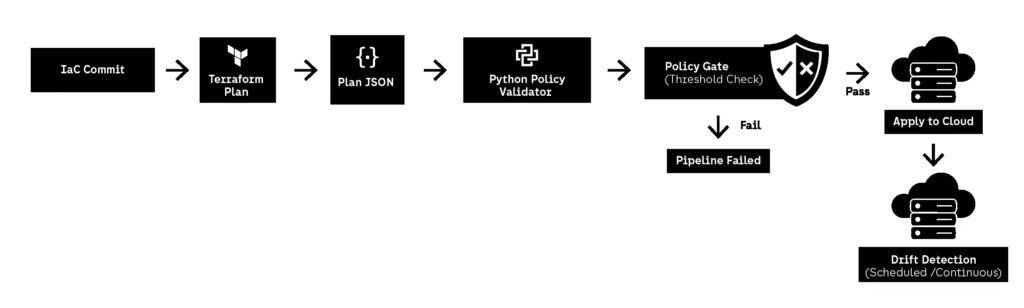
1) Parse infrastructure plans and enforce policy rules
Terraform plan output can be exported to JSON. Python can read that JSON and detect insecure resources before apply.
2) Call cloud provider APIs and detect drift
Some misconfigurations appear after deployment due to manual changes or emergency updates. Python automation can run on schedules and detect drift in real cloud accounts.
The most reliable starting point is infrastructure-as-code scanning because it blocks risk before deployment.
A typical workflow is:
- run terraform plan
- export plan to JSON
- run Python rules engine
- fail the pipeline if insecure patterns are detected
- output a report showing exactly which resource violated policy
This is DevSecOps automation that creates predictable infrastructure enforcement without slowing delivery.
What to scan for (high ROI rules)
A strong baseline includes detection of:
- public S3 buckets or blob storage
- security groups allowing 0.0.0.0/0 on sensitive ports
- IAM policies using wildcard actions or wildcard resources
- database instances exposed to public subnets
- missing encryption at rest
- missing logging / audit settings
These are not edge cases. These are the most common mistakes that show up in cloud audits.
Example: Python Terraform plan validator (policy-style logic)
A practical Python script should:
- load Terraform plan JSON
- iterate over resources
- flag high-risk configurations
- exit with a non-zero code when violations exist
DevSecOps automation becomes scalable when the rule set is reusable across multiple projects.
For a public reference on why misconfiguration detection must be automated and treated as a continuous control, CIS Benchmarks are widely used as baseline security standards across cloud providers and are frequently used as policy inputs for automated enforcement.
Tradeoffs and failure modes
The biggest failure mode is overly strict enforcement. If DevSecOps automation blocks harmless changes too often, engineering teams will bypass it. The rule set must focus on high-confidence violations that are clearly insecure.
The second failure mode is false safety. Passing a plan scan does not guarantee secure runtime behavior. This is why mature teams combine IaC validation with runtime drift detection and continuous monitoring.
The third failure mode is policy inconsistency across teams. If every team writes their own rules, enforcement becomes fragmented. DevSecOps automation is most effective when policy is centralized and applied consistently across pipelines.
Automation #4: Enforce Container Image Security Before Anything Ships
Container security is one of the areas where DevSecOps automation has the most immediate impact, because containers compress multiple risk categories into a single artifact: operating system packages, application dependencies, build tooling, runtime permissions, and configuration defaults. If insecure images are allowed into the registry, every downstream environment inherits the same problems, and remediation becomes expensive because it requires rebuilds, redeployments, and often emergency patching.
This is why container scanning cannot be treated as a “nice to have” step. DevSecOps automation must enforce container security before deployment, not after. If your pipeline only detects vulnerabilities once the image is running in production, you are not doing prevention—you are doing incident response earlier.
DevSecOps automation also matters here because container vulnerabilities are noisy. Every image scan produces dozens or hundreds of findings, many of which are low risk or irrelevant to your threat model. The goal is not to block everything. The goal is to enforce policy: reject images that violate high-confidence rules and allow the rest to move forward with visibility.
What this automation does
This automation should:
- scan container images automatically during CI/CD
- detect OS-level vulnerabilities and application-level vulnerabilities
- enforce policy rules such as “no CRITICAL vulnerabilities allowed”
- validate image metadata (base image, tags, signing, provenance)
- prevent unapproved images from being pushed to the registry
- generate a readable report that explains why the image was blocked
This is DevSecOps automation that saves time because it stops insecure artifacts from spreading across environments, which prevents downstream remediation work and production firefighting.
Why it matters at scale
At scale, container images behave like supply chain distribution. One insecure base image can affect dozens of microservices. A single misconfigured Dockerfile can lead to persistent risks such as running as root, exposing unnecessary ports, or embedding secrets into build layers.
DevSecOps automation prevents this by treating container policy enforcement as a gate. If the artifact is unsafe, it should never enter the registry. If the artifact is safe, it should move forward without requiring manual security review.
This matters even more because container security is now tightly linked to software supply chain risk, which is why container scanning is often paired with provenance validation, signing enforcement, and SBOM generation. If you want a broader internal reference on modern security threat patterns, including how software delivery pipelines are changing in 2026, Cybersecurity Trends for 2026: AI Attacks, Zero Trust, and the New Threat Landscape is a useful context piece that aligns with why container enforcement is now mandatory.
How it works (Python approach)
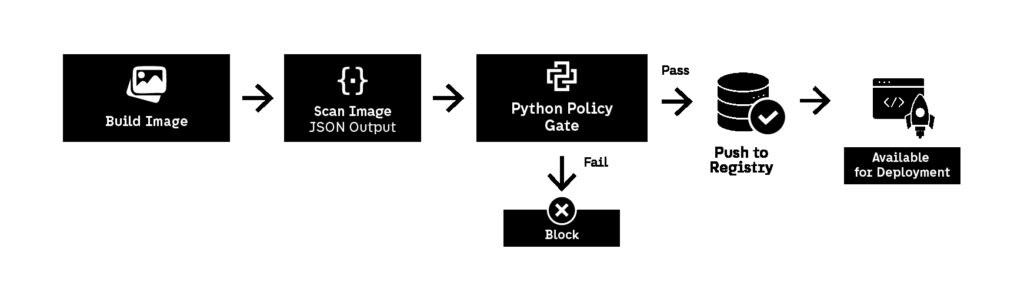
Most container scanners already exist as CLI tools (Trivy, Grype, Clair, Anchore). The role of Python DevSecOps automation is not to reinvent scanning. The role is to normalize output and enforce policy consistently.
A typical workflow looks like this:
- build the container image in CI/CD
- run scanner and export results to JSON
- parse results with Python
- fail the pipeline if policy thresholds are exceeded
- attach a Markdown report to the pipeline output
This approach allows DevSecOps automation to stay tool-agnostic. You can switch scanners later without rewriting your policy logic.
A mature policy typically enforces:
- block CRITICAL vulnerabilities always
- block HIGH vulnerabilities unless explicitly approved
- allow MEDIUM vulnerabilities but report them
- reject images running as root
- reject images with outdated base OS layers
- enforce minimal image size and package footprint
This is where DevSecOps automation stops being “security scanning” and becomes “artifact governance.”
Example policy checks that actually matter
A container security script should not only look at vulnerability severity. It should also enforce structural checks that reduce attack surface:
- no root user in final image
- no package managers installed in production layers
- no SSH or shell tooling unless explicitly required
- no exposed debug ports
- no credentials baked into environment variables
- no unpinned base images (avoid latest)
This is DevSecOps automation that makes container security predictable and scalable.
External reference: why signing and provenance matter
Container security is increasingly tied to software supply chain controls. Modern best practice includes signing images and verifying provenance before deployment. A strong public reference is the Sigstore project, which provides open standards for signing, verification, and transparency logs. DevSecOps automation can integrate signature validation into the same pipeline gate as vulnerability scanning, creating a single enforcement point.
Tradeoffs and failure modes
The biggest failure mode is blocking too aggressively. If DevSecOps automation blocks every build due to low-risk vulnerabilities in base OS packages, teams will bypass the control or stop patching entirely. The solution is to enforce strict thresholds only for CRITICAL/HIGH vulnerabilities and maintain a patching cadence for everything else.
Another failure mode is report overload. If the pipeline generates a 200-line vulnerability report, developers will not read it. DevSecOps automation should output only the top issues that are blocking and summarize the rest.
Finally, container security enforcement must happen early. If images are allowed into registries and only blocked later during deployment, the artifact has already propagated. DevSecOps automation must gate at the point of creation.
Automation #5: Validate Kubernetes Manifests and Block Risky Deployments
Kubernetes is one of the most powerful platforms for scaling infrastructure, but it is also one of the fastest ways to scale insecure configuration. Teams rarely deploy risky workloads intentionally. The problem is that Kubernetes makes it easy to introduce insecure defaults gradually: privileged containers, overly permissive service accounts, open network policies, missing resource limits, and deployments that quietly run as root.
This is why Kubernetes security cannot depend on cluster administrators manually reviewing YAML. In real organizations, Kubernetes manifests change constantly, often across multiple repositories and teams. DevSecOps automation is the only reliable way to enforce baseline policies consistently without slowing delivery.
In 2026, Kubernetes security is no longer just about runtime threats. It is about controlling configuration drift and preventing insecure deployment patterns from becoming “normal.” DevSecOps automation makes that possible by validating manifests at the same stage as tests and builds: before they are merged and applied.
What this automation does
This automation should:
- scan Kubernetes YAML manifests during pull requests
- detect high-risk configurations (privileged mode, root user, hostPath volumes)
- enforce policy rules such as “no privileged containers allowed”
- validate RBAC bindings and service account permissions
- ensure resource limits exist to prevent noisy-neighbor risk
- block merges or fail CI/CD when violations exist
- generate a readable report that developers can fix immediately
This is DevSecOps automation that saves time because it prevents production firefighting caused by misconfigured workloads and reduces security team involvement in routine deployment review.
Why it matters at scale
At scale, Kubernetes risk is rarely a single catastrophic decision. It is usually a gradual accumulation of small insecure exceptions. One team enables privileged mode for debugging. Another mounts the Docker socket. Another disables securityContext checks because the workload “needs it.” Over time, the cluster becomes a patchwork of exceptions that are impossible to audit manually.
DevSecOps automation prevents this by enforcing baseline rules consistently. Instead of relying on “best practices” documents that nobody reads, the pipeline becomes the policy.
Kubernetes misconfigurations also connect directly to broader cloud threat patterns. If a workload is privileged and has access to cloud credentials through a service account, exploitation can escalate quickly. This is why Container Security in Action: Tools & Techniques that Work for 2026 is a useful internal reference, since container and Kubernetes security failures usually overlap.
How it works (Python approach)
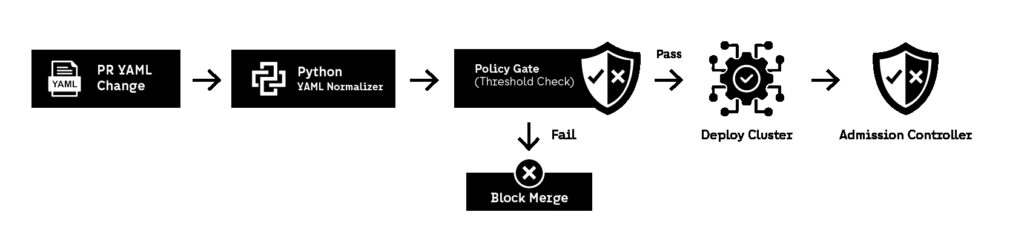
Most Kubernetes security tools already exist as policy engines (OPA Gatekeeper, Kyverno, kube-score, kube-bench). The goal of Python DevSecOps automation is not to replace them, but to orchestrate enforcement in a consistent CI/CD workflow.
A practical pipeline flow looks like:
- detect changed Kubernetes manifests in the PR
- parse YAML into structured objects
- apply policy rules (securityContext, RBAC, network policies)
- fail the build if violations exist
- generate a short Markdown report that explains what must be changed
Python is a strong fit here because it can parse YAML quickly and apply rule logic in a readable way that teams can extend.
This is DevSecOps automation that creates enforcement without requiring every team to understand Kubernetes security internals.
High-value policy checks (what to block immediately)
A strong baseline includes checks for:
- privileged: true containers
- missing runAsNonRoot: true
- missing readOnlyRootFilesystem: true
- hostNetwork: true workloads
- hostPath mounts (especially /var/run/docker.sock)
- service accounts with cluster-admin bindings
- missing CPU/memory resource limits
- containers running with CAP_SYS_ADMIN or broad capabilities
- deployments missing liveness/readiness probes
These are high-confidence risks. Blocking them early is exactly what DevSecOps automation is supposed to do.
Example: Python Kubernetes YAML policy validator (workflow logic)
A simple Python validator should:
- load YAML files
- identify workloads (Deployment, Pod, DaemonSet, StatefulSet)
- check for risky securityContext patterns
- report violations by file and resource name
- exit with non-zero status code to fail CI/CD
This is DevSecOps automation that can be implemented quickly and improved gradually.
External reference: Kubernetes security best practices
For a strong public baseline on Kubernetes security hardening, Kubernetes Security Best Practices is a useful official reference that aligns well with policy enforcement automation.
Tradeoffs and failure modes
The biggest failure mode is excessive strictness. Some workloads genuinely require elevated permissions. DevSecOps automation should support exception workflows, but exceptions must be explicit and traceable. Otherwise, “temporary exceptions” become permanent security holes.
Another failure mode is rule fragmentation. If every team writes their own YAML validators, enforcement becomes inconsistent and audits become meaningless. The most scalable approach is to centralize policy rules and reuse them across repositories.
Finally, remember that CI/CD validation is not a replacement for runtime enforcement. It is a prevention layer. Mature DevSecOps automation stacks combine pipeline validation with admission controllers and runtime monitoring.
Automation #6: Generate Compliance Evidence Automatically Without Slowing Delivery
Compliance work is one of the biggest hidden time sinks in security teams. Logs must be collected, controls must be proven, evidence must be exported, and audits must be answered—often under tight deadlines. In many organizations, this work is still handled manually, even though the underlying controls already exist inside CI/CD and cloud platforms.
This is where DevSecOps automation delivers disproportionate value. Compliance requirements rarely demand new controls. They demand proof that existing controls are running consistently. When that proof is collected manually, it becomes expensive and error-prone. When it is automated, compliance becomes a byproduct of delivery rather than a parallel process.
DevSecOps automation in 2026 increasingly focuses on evidence generation. Instead of asking teams to prepare audit artifacts retroactively, the pipeline produces evidence continuously as part of normal operation.
What this automation does
This automation should:
- collect evidence from CI/CD runs automatically
- capture security checks, scan results, and policy decisions
- timestamp and store evidence immutably
- map evidence to specific controls or requirements
- export reports in auditor-friendly formats (Markdown, PDF, JSON)
- reduce audit preparation time to near zero
This is DevSecOps automation that saves time because it eliminates last-minute audit scrambles and reduces the operational load on security and platform teams.
Why it matters at scale
At scale, compliance does not fail because teams ignore controls. It fails because evidence is incomplete, inconsistent, or scattered across tools. One team stores scan logs in CI/CD artifacts. Another stores screenshots. Another exports CSVs manually. During an audit, this fragmentation turns into days or weeks of work.
DevSecOps automation solves this by making evidence collection systematic. Every pipeline run produces traceable proof that controls are executed and whether they passed or failed. That proof is stored automatically, without relying on humans to remember to collect it.
This is especially important for organizations operating in regulated environments or working with enterprise customers, where audit readiness directly affects sales cycles and renewal decisions.
How it works (Python approach)
Python is well suited for compliance automation because it can act as a glue layer across multiple systems. A typical approach is:
- run security controls in CI/CD (scanners, policy checks, validators)
- collect outputs and metadata programmatically
- normalize results into a standard evidence format
- store evidence in object storage or compliance repositories
- generate on-demand reports for audits
This approach allows DevSecOps automation to remain flexible. When compliance frameworks change, the evidence pipeline adapts without rewriting the underlying security controls.

What evidence should be captured
High-value evidence includes:
- pipeline execution logs
- vulnerability scan summaries
- policy gate decisions (pass/fail)
- configuration validation results
- timestamps and commit identifiers
- tool versions and rule versions
This is not about collecting everything. It is about collecting the right signals that prove controls are running as intended.
External reference: why continuous evidence matters
Modern compliance frameworks increasingly encourage continuous control monitoring instead of point-in-time checks. A useful public reference is NIST SP 800-53 Rev. 5, which emphasizes ongoing assessment and monitoring as part of security assurance.
Tradeoffs and failure modes
The most common failure mode is over-collection. If DevSecOps automation stores massive logs without structure, evidence becomes hard to query and harder to audit. Evidence must be concise and mapped to controls.
Another failure mode is manual intervention. If teams must manually trigger evidence exports, the system will fail under pressure. Evidence collection must be automatic and continuous.
Finally, evidence generation must not slow pipelines. DevSecOps automation should collect data asynchronously or after critical path execution, ensuring delivery speed is preserved.
Automation #7: Automate Security Alert Triage and Incident Routing (Without Pager Fatigue)
Security monitoring is useless if alerts don’t lead to action. Most teams already collect logs, detect suspicious activity, and generate security findings. The problem is that the output often becomes operational noise. Alerts go to the wrong channel, incidents get lost in ticket queues, and engineers stop responding because the system generates too many false positives.
This is where DevSecOps automation becomes critical again. Detection is not the hard part anymore. Response is. If security findings are not routed, enriched, prioritized, and tracked automatically, they turn into backlog instead of risk reduction.
DevSecOps automation in 2026 must treat incident routing as a pipeline, not as a human responsibility. The goal is to reduce mean time to acknowledge (MTTA) and mean time to remediate (MTTR) by making alert triage automatic.
What this automation does
This automation should:
- ingest alerts from scanners, cloud security tools, or SIEM systems
- normalize and deduplicate alerts
- enrich alerts with context (service name, repo, owner, severity)
- route alerts to the correct channel (Slack, email, ticket system)
- automatically open tickets for high-severity findings
- suppress repeat alerts that have already been acknowledged
- generate weekly summaries for lower-priority findings
This is DevSecOps automation that saves time because it prevents security teams from manually triaging the same alert patterns every day.
Why it matters at scale
At scale, alerting systems fail in two predictable ways.
The first is overload. Every scanner produces findings. Every cloud platform generates logs. Every runtime monitoring system creates warnings. Without DevSecOps automation to filter and prioritize, the signal-to-noise ratio collapses.
The second is ownership ambiguity. Security alerts often fail because nobody knows who owns the service. If a critical vulnerability is detected but the alert goes to the wrong team, remediation time increases automatically.
DevSecOps automation solves this by making routing deterministic. Alerts should be mapped to:
- repository ownership files (CODEOWNERS)
- service catalog metadata
- Kubernetes namespace ownership
- cloud account tagging standards
This ensures the right team receives the right alert immediately.
How it works (Python approach)
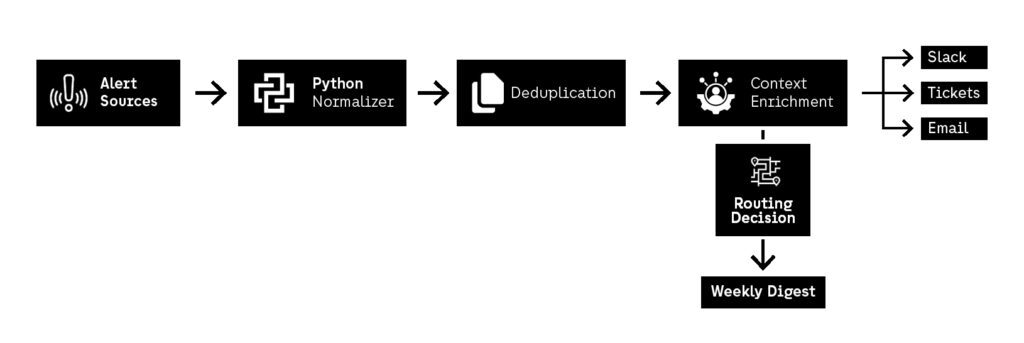
Python is extremely effective for alert routing automation because it can integrate with almost anything: Slack APIs, Jira APIs, GitHub issues, email services, and SIEM webhooks. The key is to treat alerts like structured events rather than messages.
A strong workflow looks like:
- ingest alerts as JSON
- normalize severity categories
- deduplicate by fingerprint (same issue, same asset, same time window)
- enrich with metadata (team owner, service name, environment)
- route based on policy rules
- log actions taken for auditability
This turns alerting into DevSecOps automation rather than “security spam.”
High-value alert rules that reduce noise
A good automation script should enforce rules such as:
- CRITICAL findings create tickets automatically
- repeated alerts within 24h are suppressed
- alerts with missing ownership are escalated to platform/security teams
- low-severity alerts are aggregated into weekly digests
- public exposure alerts bypass normal queues and trigger escalation
This is DevSecOps automation that improves security outcomes while reducing alert fatigue.
External reference: why alerting must be actionable
A strong public reference for structuring security operations and incident response is the NIST Computer Security Incident Handling Guide, which emphasizes triage, prioritization, and consistent response workflows. DevSecOps automation directly supports this by making incident routing repeatable and measurable.
Tradeoffs and failure modes
The most common failure mode is over-automation. If DevSecOps automation automatically creates tickets for everything, ticket systems become useless. The system must only escalate what truly matters.
Another failure mode is missing context. If alerts are routed without enrichment, teams waste time investigating basic metadata. Every alert should include service context, links to the affected repo, and recommended remediation steps.
Finally, DevSecOps automation must be transparent. If teams don’t trust why alerts were suppressed or routed, they will bypass the system. Routing logic must be visible and auditable.
What DevSecOps Automation Actually Changes in 2026
DevSecOps automation stops being a tooling discussion once organizations reach a certain scale. In 2026, the difference is not whether teams scan, validate, or monitor—it’s whether those controls run consistently, automatically, and without human dependency. The seven automations in this guide all point to the same structural shift: security only scales when it is embedded directly into delivery workflows.
Across secrets detection, dependency governance, cloud configuration, container enforcement, Kubernetes validation, compliance evidence, and alert routing, DevSecOps automation replaces manual review with deterministic enforcement. That shift reduces operational drag, shortens feedback loops, and removes entire categories of avoidable incidents. Most importantly, it frees security and engineering teams to focus on higher-value work instead of repeating the same checks under pressure.
What often limits DevSecOps automation in practice is not technology, but execution capacity. Automation needs to be designed, implemented, maintained, and evolved as platforms change. This is where having the right operating model matters. For organizations that need continuous infrastructure oversight, proactive monitoring, and security-aware operations at scale, Fyld’s IT Managed Services provide structured service management, continuous monitoring, and proactive maintenance that align naturally with automation-driven security operations.
DevSecOps automation also depends on having teams that can move quickly without compromising quality. When internal capacity is constrained or uneven, scaling automation initiatives becomes difficult. Fyld’s Team-as-a-Service model allows organizations to integrate experienced engineers, without the friction of long hiring cycles.
For organizations operating across multiple markets or delivery centers, DevSecOps automation benefits even more from strong collaboration and time-zone alignment. Fyld’s Nearshore Software Development services support this by providing geographically close, security-aware teams that can collaborate in real time and maintain automation workflows as part of daily delivery, rather than treating security as an external dependency.
Finally, as automation maturity increases, many companies reach a point where internal teams need reinforcement rather than replacement. Fyld’s IT Team Expansion approach supports this transition by extending existing teams with specialized profiles while maintaining consistent security, compliance, and delivery standards—exactly the conditions DevSecOps automation relies on to stay effective over time.
In 2026, DevSecOps automation is no longer about proving that security can be automated. That question has already been answered. The real challenge is operationalizing it sustainably—across teams, pipelines, and platforms—without slowing delivery or burning out people. Organizations that solve that challenge don’t just improve security posture; they build delivery systems that are resilient by design.